 |
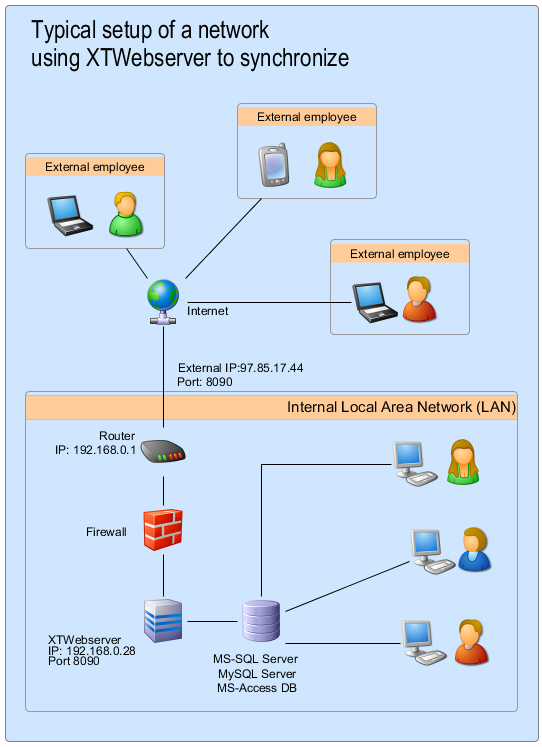
Here you can see a typical network setup using the Xpert-Timer SyncServer. Is the XTSyncServer absolutely necessary? The XTSyncServer is always necessary if data is not transferred from Windows to Windows via WLAN or LAN, but via the Internet or from Android to Windows. Are your employees constantly on the road? Perfect! The recorded data can now be synchronized directly with the central database in the company via the Internet while on the move. A VPN tunnel is therefore no longer necessary. How does the data exchange work? The XTSyncServer (https://download.xperttimer.de/XTInstSyncserver.exe) receives the data from the Internet via the router. The XTSyncServer can be started as a service or as an .exe file. In companies with a server structure, we recommend using it as a service on the server, as this enables data exchange at any time. Where is the decision made about how synchronization will take place? If a synchronization file is created and activated on the employee's laptop, they can exchange data via the menu item "Program" -> "Synchronize database." In the synchronization dialog, you can then select whether to synchronize via the XTSyncServer or via the direct database connection (LAN or VPN). What is required to synchronize with the Xpert-Timer Mobile Android app? To use synchronization via the Internet, you always need the XTSyncServer.
|