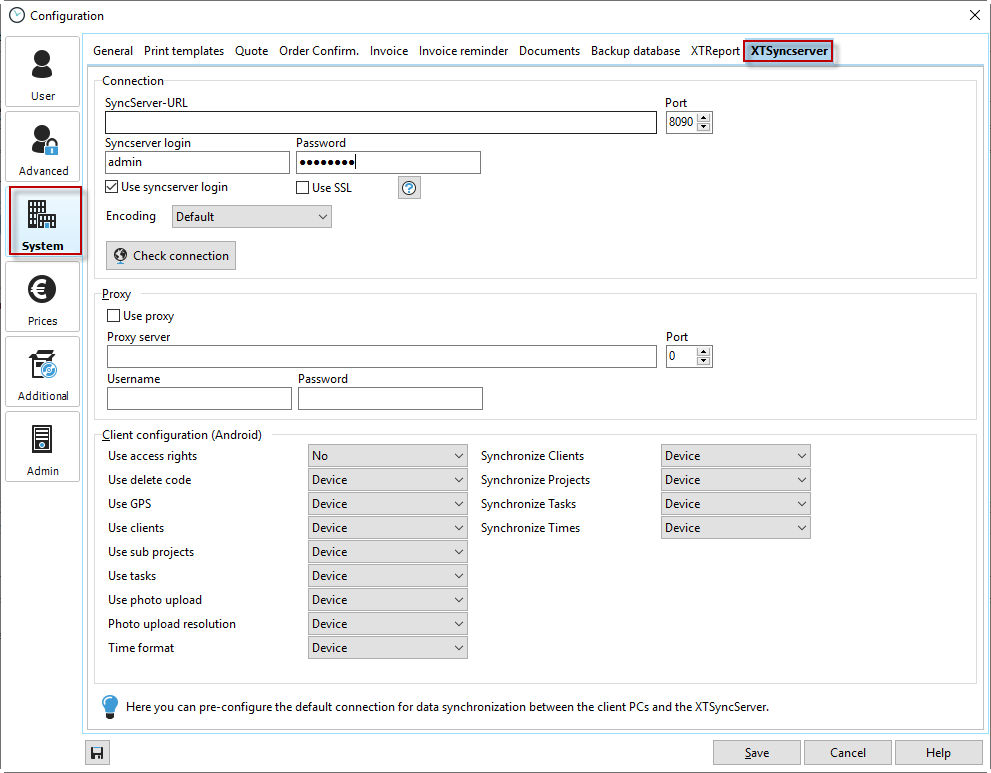
The information for establishing a connection to the XTSyncServer is provided here solely to simplify the synchronization settings. None of the information provided here is essential. If you fill in this information and then create the synchronization file, this data will be written to the file and transferred to the client. Otherwise, you will need to provide the information during the initial synchronization.
Sync server URL |
This should be the IP address or URL of the server/PC on which the XTSyncServer is running. |
|---|---|
Sync server login/password |
You entered this login information directly in the XTSyncServer configuration. To establish a connection, both entries must be identical. |
Use SyncServer login / Use SSL |
Login to SyncServer is only possible with a username and password. You can activate encrypted transmission with the "Use SSL" option.
|
Encoding |
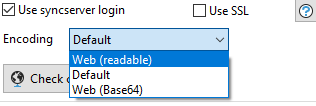 To access the REST server via your own application via http. |
Check connection |
Here you can test the connection to SyncServer. |
Client configuration (Android) |
Here you can manage the rights of your Android users. If you use the rights system here, you can restrict the functionality of the Android user. For example, you can prohibit the Android user from deleting projects. |
|
Note |
|---|---|
Here you can preconfigure the default connection data for synchronizing client PCs with the XTSyncServer. |
|
